
Acceleration: multicore CPU, compiled formulas and GPU
On every trial, OpenRiskSim writes the drawn values into the assumption cells, recalculates the workbook and reads the forecasts. With the full spreadsheet engine (HyperFormula) that gives, at most, tens of thousands of trials per second: enough for 5,000–10,000 trials, but slow if you want 100,000 or a million. The Acceleration section evaluates trials much faster by using every processor core, by compiling the formulas or by using the graphics card (GPU).
In short
Leave the mode on Automatic. OpenRiskSim picks the fastest mode your model supports, checks that the results match the spreadsheet and, if anything goes wrong, falls back to standard mode. Acceleration never makes a simulation fail.
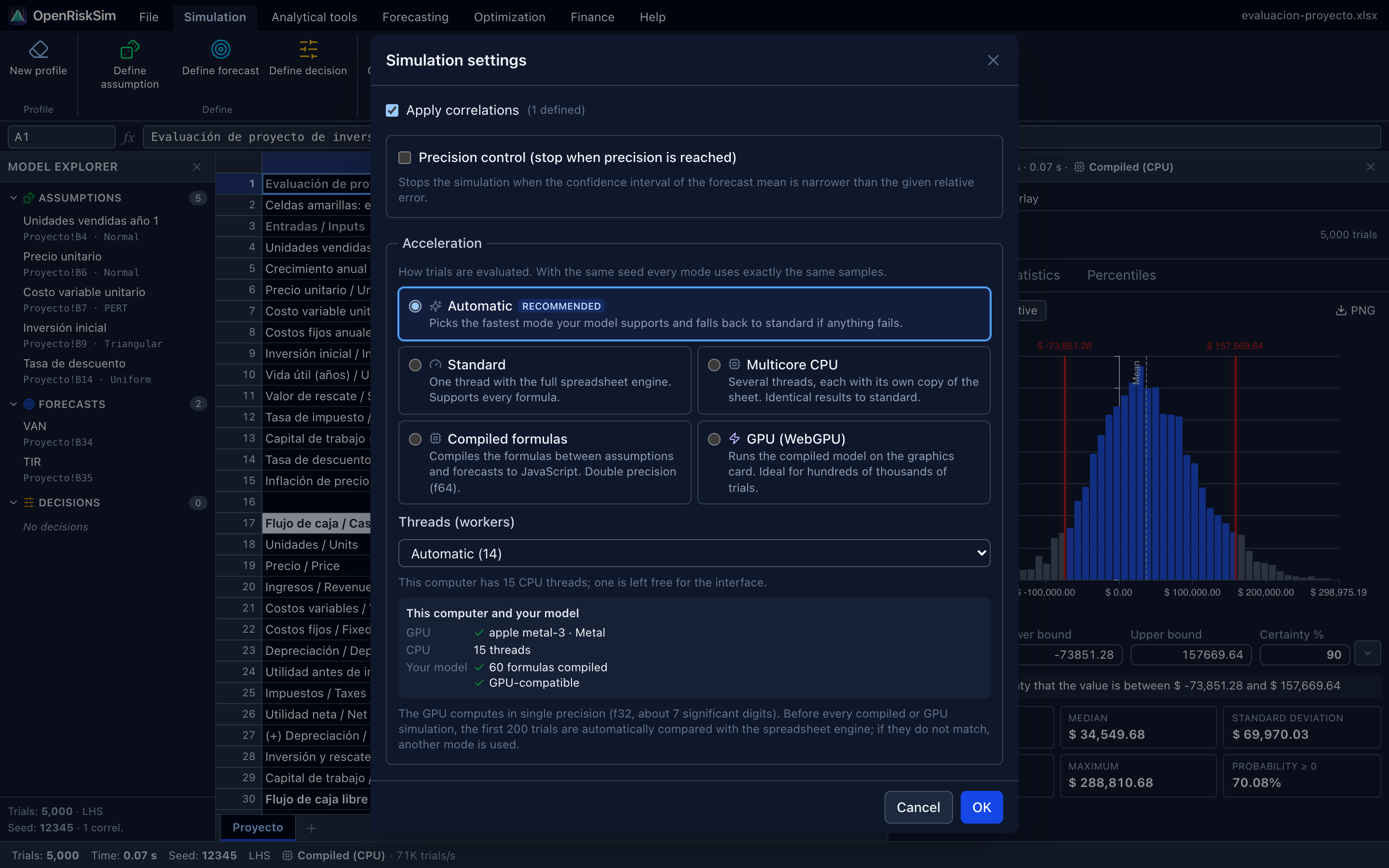
Where to set it
Simulation → Settings → Acceleration section, at the bottom of the Simulation settings dialog. Like the rest of the settings, the chosen mode is saved with the model inside the .xlsx.
Every mode uses exactly the same samples: assumption values are drawn once before evaluation (with the configured seed, sampling method and correlations) and then handed to the evaluators. So with the same seed, switching modes only changes speed (and, on the GPU, the last digits; see Precision).
The five modes
| Mode | What it does | Precision | When to use it |
|---|---|---|---|
| Automatic recommended | Picks the fastest mode your model supports and falls back to standard if anything fails. | That of the chosen mode | Always, unless you want to force a specific mode. |
| Standard | One thread with the full spreadsheet engine. Supports every formula. | Double (f64), reference | For comparison, or if you suspect a problem with acceleration. |
| Multicore CPU | Several threads (Web Workers), each with its own copy of the sheet. | Identical to standard | Models that cannot be compiled (they use unsupported functions) with many trials. |
| Compiled formulas | Translates the formulas between assumptions and forecasts to JavaScript and runs them directly, bypassing the spreadsheet engine. | Double (f64) | Any compatible model; the fastest up to a few tens of thousands of trials. |
| GPU (WebGPU) | Runs the compiled model on the graphics card, thousands of trials in parallel. | Single (f32), validated | Hundreds of thousands or millions of trials. |
If a mode cannot run on your computer or with your model, it is tagged unavailable. You can still choose it: the simulation runs with the next possible mode and tells you so (see The Fallback chip).
Threads (workers)
With Multicore CPU or Automatic, the Threads (workers) selector appears. Automatic (n) uses the number of processor threads minus one (the free one keeps the interface responsive), up to 16. You can set any number between 1 and 16.
What Automatic chooses
In this order:
- GPU, if WebGPU is available, the model is GPU-compatible and there are 20,000 trials or more.
- Otherwise Compiled formulas, if the model compiles (any number of trials).
- Otherwise Multicore CPU, if there are 2,000 trials or more and the computer has more than one thread.
- Otherwise Standard.
Below 20,000 trials it isn't worth setting up the GPU: compiled mode already finishes in a fraction of a second.
If you pick a specific mode and it cannot be used, another one takes over: GPU → Compiled formulas (if the model compiles) → Standard; Compiled formulas → Standard; Multicore CPU → Standard.
Many trials without acceleration
Trials accepts up to 5,000,000 (quick buttons: 1,000, 5,000, 10,000, 100,000 and 1 M). If you ask for more than 200,000 trials and the run will use the standard engine (Standard mode, or Automatic with a model that does not compile), the dialog warns: “More than 200,000 trials without acceleration may take several minutes and use a lot of memory. Consider Automatic, Compiled or GPU mode.”
The This computer and your model panel
Below the modes, the dialog analyses your browser and your model (Detecting capabilities… for a moment):
| Row | What it shows |
|---|---|
| GPU | ✓ the graphics card and the API the browser uses, e.g. apple metal-3 · Metal (for privacy, many browsers only report the vendor and architecture, not the exact model; (software) means only an emulated adapter is available). Or ✗ the reason: WebGPU is not available in this browser or No compatible GPU adapter was found. |
| CPU | How many threads the processor has, e.g. 14 threads. |
| Your model | ✓ N formulas compiled, or ✗ cannot be compiled: followed by the cell and the reason (e.g. Sheet1!B12: function VLOOKUP is not supported by the compiler; “(+3)” means more cells have problems). If it compiles, a second line says ✓ GPU-compatible or ✗ not GPU-compatible: and the reason. With no assumptions and forecasts yet: Define assumptions and forecasts to analyse the model. |
The final note reminds you that the GPU computes in single precision and that results are validated automatically (see below).
Making a model compatible
The reason names the exact cell. Usually it is enough to rewrite that formula with supported functions (for instance, a VLOOKUP over a fixed table can be replaced by INDEX with a constant position, or the calculation moved to a cell that does not depend on the assumptions). See Which models can be compiled.
Which mode was used
When the run finishes, the status bar shows, next to Trials, Time and Seed, a label with the backend used and its speed:
- GPU · apple metal-3 · Metal · 685K trials/s (lightning icon),
- Compiled (CPU) · 323K trials/s,
- 14 cores · 95K trials/s (multicore CPU with 14 workers),
- Standard · 23K trials/s.
(Figures from the “Project evaluation” example; see Measured performance.)
The header of the Results panel repeats the summary (N trials · time · backend). Hovering the label shows the details: Backend and precision (f64 or f32), trials per second, Requested mode (if different from the one used), Validated against the sheet: N values, max. relative error … (compiled and GPU modes) and, if any, the fallback reason.
The speed covers the whole run (sampling, evaluation, statistics and sensitivity), not just formula evaluation.
The Fallback chip
If a mode was requested and another one ended up being used because something failed, the amber Fallback chip appears. Hover it to read Another mode was used: and the reason. The most common ones:
| Reason | Meaning |
|---|---|
| The model cannot be compiled — Sheet1!C8: … | A formula between assumptions and forecasts uses something the compiler does not support. |
| Not GPU-compatible — … | The model compiles, but something exists only on the CPU (e.g. MEDIAN) or the model is too large for the GPU. |
| WebGPU is not available in this browser / No compatible GPU adapter was found | See Troubleshooting. |
| GPU results did not match the spreadsheet engine (max. relative error …) | Validation found a difference above the tolerance; compiled or standard mode was used instead. |
| Web Workers cannot be started here | The browser does not allow extra threads (rare). |
In Automatic mode, a missing GPU or a model that does not compile is not a failure: the next mode is simply chosen, without a chip. The chip appears only when a mode that was about to be used failed (GPU initialisation, validation, an error mid-run).
GPU: WebGPU, CUDA and MPS
A browser cannot call CUDA (NVIDIA) or MPS / Metal Performance Shaders (Apple) directly: those are native libraries a web page has no access to. What modern browsers do offer is WebGPU, a web standard for GPU computing that the browser translates to each system's native API:
| System | WebGPU runs on |
|---|---|
| macOS, iPadOS, iOS | Metal — the same GPU (Apple Silicon, AMD or Intel) MPS uses |
| Windows | Direct3D 12 |
| Linux, Android, ChromeOS | Vulkan |
So NVIDIA, AMD, Intel and Apple GPUs are used through their regular drivers, with nothing to install. When there are two GPUs (integrated and discrete), OpenRiskSim asks for the high-performance one; the browser decides which one it gets.
Browsers with WebGPU (recent versions): Chrome and Edge 113 or later on Windows, macOS and ChromeOS (and Chrome on recent Android); Safari 26 or later on macOS, iPadOS and iOS; Firefox 141 or later on Windows (Firefox is enabling it progressively on other systems). On Linux, Chrome support depends on the version and the driver. If your browser lacks WebGPU, OpenRiskSim uses compiled mode, which is also very fast.
Precision
- Standard, Multicore CPU and Compiled formulas compute in double precision (f64), like Excel. With the same seed they give bit-identical results: multicore uses the same spreadsheet engine in every thread and merges the trials in order; compiled mode rounds its results exactly like the spreadsheet engine. In addition, compilation checks that the compiled program reproduces the sheet's current values, and before every run the first 200 trials are compared with the spreadsheet engine (relative tolerance 10⁻⁹).
- GPU computes in single precision (f32), about 7 significant digits. Before every run, the first 200 trials are also evaluated with the spreadsheet engine and compared forecast by forecast, with a relative tolerance of 10⁻⁴ (measured against the forecast's scale, so an NPV close to zero is not judged by rounding noise). If they don't match, the simulation automatically switches to compiled or standard mode.
Does the difference matter? In practice, no: a 10⁻⁴ relative error on a $40,000 NPV is about $4, far below the sampling error of any simulation (with 100,000 trials, the standard error of that NPV's mean is around $220). Probabilities and percentiles can only change marginally if a trial falls exactly on a boundary. If you need to reproduce someone else's numbers exactly, use the same mode (or any non-GPU mode) with the same seed.
Which models can be compiled
The compiler only looks at the cells between the assumptions and the forecasts: it starts at each forecast, follows its references backwards and compiles the formulas that depend (directly or indirectly) on an assumption or decision variable.
Cells that don't depend on the assumptions can use any function
A formula that depends on no assumption has the same value in every trial, so it is taken as a constant with the value the sheet computes. It can use VLOOKUP, SUMIF, dates, text… without preventing compilation. Just avoid the volatile functions listed below.
Supported functions
| Group | Functions | CPU (JS) | GPU |
|---|---|---|---|
| Arithmetic and operators | + - * / ^, %, comparisons = <> < <= > >= | ✓ | ✓ |
| Aggregates | SUM, AVERAGE, MIN, MAX, COUNT, PRODUCT, SUMPRODUCT | ✓ | ✓ |
MEDIAN | ✓ | — | |
| Math | ABS, SQRT, EXP, LN, LOG, LOG10, POWER, MOD, ROUND, ROUNDUP, ROUNDDOWN, TRUNC, INT, SIGN, PI | ✓ | ✓ |
| Logical | IF, IFERROR, AND, OR, NOT, TRUE/FALSE, ISERROR/ISERR, ISNUMBER | ✓ | ✓ |
| Lookup | CHOOSE and INDEX, with a constant position | ✓ | ✓ |
| Financial | NPV, IRR, MIRR, PV, FV, PMT, NPER | ✓ | ✓ |
| OpenRiskSim | ORS.NORMAL, ORS.LOGNORMAL, ORS.UNIFORM, ORS.TRIANGULAR, ORS.PERT, ORS.MIRR, ORS.PAYBACK, ORS.DPAYBACK, ORS.PI | ✓ | ✓ |
References to other sheets, ranges (up to 100,000 cells) and defined names are supported as well.
What prevents compilation
| Cause | Example reason |
|---|---|
Volatile functions or functions with hidden references in any cell a forecast depends on: RAND, RANDBETWEEN, RANDARRAY, NOW, TODAY, INDIRECT, OFFSET, CELL, INFO | RAND is volatile or uses hidden references and cannot be compiled |
Any other unsupported function in a cell that depends on the assumptions (VLOOKUP, SUMIF, date or text functions…) | function VLOOKUP is not supported by the compiler |
CHOOSE or INDEX with a position that depends on the assumptions | INDEX with a simulated position is not supported |
| Formulas that produce text, or text concatenation with simulated values | the formula produces text, which cannot be simulated |
Whole-column or whole-row references (A:A, 3:3) or ranges over 100,000 cells | Whole-column / whole-row references are not supported |
| Circular references | circular reference |
| Models reaching more than 500,000 cells | the model references more than 500000 cells |
What prevents the GPU (even if it compiles)
MEDIANin a simulated cell (MEDIAN is only available on the CPU).- More than 5,000 compiled formulas (the GPU shader is limited to 5000).
- Constants outside the single-precision range (larger than about 3.4 × 10³⁸).
In those cases compiled mode is used; its evaluation is still about 100 times faster than the standard engine's.
Measured performance
Project evaluation example, Apple M5 Pro with Chrome, total simulation time (sampling, evaluation, statistics and sensitivity):
| Mode | 100,000 trials | 1,000,000 trials | 5,000,000 trials |
|---|---|---|---|
| Standard | 4.31 s | — | — |
| Multicore CPU (14 workers) | 1.05 s | — | — |
| Compiled formulas | 0.31 s | 1.76 s | — |
| GPU (WebGPU) | 0.31 s | 1.46 s | 8.0 s |
Formula evaluation speed alone, excluding sampling and statistics:
| Engine | Trials per second (order of magnitude) |
|---|---|
| Spreadsheet engine (HyperFormula) | ~15,000 |
| Compiled formulas (JavaScript) | ~1.5 million |
| GPU (WebGPU) | 64–120 million |
These evaluation speeds were measured separately, on test models, and vary with model size and hardware.
With many trials, evaluation is no longer the bottleneck: the remaining time goes into drawing the samples (including LHS and correlations) and computing statistics and sensitivity, which run on the CPU. That is why the GPU, although it evaluates almost 100 times faster than compiled mode, only cuts the total time from 1.76 s to 1.46 s for a million trials. Your timings will depend on hardware, browser and model size.
Troubleshooting
“WebGPU is not available in this browser”.
- Update your browser to a recent version (see browsers with WebGPU).
- In Chrome or Edge, open
chrome://gpu(oredge://gpu) and look for the WebGPU line: if it says Disabled or Software only, update your graphics drivers; browsers sometimes disable the GPU on drivers with known bugs. - Experimental options in
chrome://flagsorabout:flags(e.g. Unsafe WebGPU) are for testing only: don't leave them on for everyday use. - On Safari before version 26, WebGPU can be tried in Safari Technology Preview.
- On Linux, Chrome may need Vulkan enabled (a Vulkan driver installed and, depending on the version, the Vulkan option in
chrome://flags).
“No compatible GPU adapter was found”. The browser has WebGPU but offers no GPU: it may be blocklisted, disabled by the browser's hardware acceleration setting (Settings → System → Use hardware acceleration), or you may be in a virtual machine or remote desktop.
The simulation is slow although I chose GPU. Look at the status-bar label: if it doesn't say GPU, hover the Fallback chip to see why. If it says Standard, the model does not compile: the Your model row names the cell responsible.
GPU results differ in the last decimals. That is expected from single precision (see Precision). For a report that must match a classmate's exactly, use the same mode and the same seed.
For developers
The compiler lives in the @openrisksim/accel package. See Architecture and Numerical engine.